
Recently, I was asked about Docker’s memory consumption. Before diving into the details, it’s crucial to clarify whether we’re referring to RAM or storage.”
When it comes to file system storage, Docker images are built upon a series of distinct layers. The effective size of an image is the sum of its distinct layers. It’s important to note that deleting a file in an upper layer does not free up space from the underlying layers; thus, the storage footprint only expands as new layers are added. Despite this, the layered approach is highly efficient, as multiple images can share identical base layers, leading to significant disk space savings.
Next, we’ll delve into RAM memory usage. When you run a Docker image—think of it as a blueprint—the system instantiates it, bringing it into memory for active execution. A primary question arises from this process: Does the container’s data reside entirely in RAM, or how is its memory footprint handled?
Consider two Docker images for comparison. One image is significantly larger due to a greater number of installed packages, despite both being designed to run the same main.py file.
# main.py
import time
import random

def main():
    while True:
        wait_time = random.randint(2, 10)
        print(f"waiting {wait_time} seconds...")
        time.sleep(wait_time)

if __name__ == "__main__":
    main()
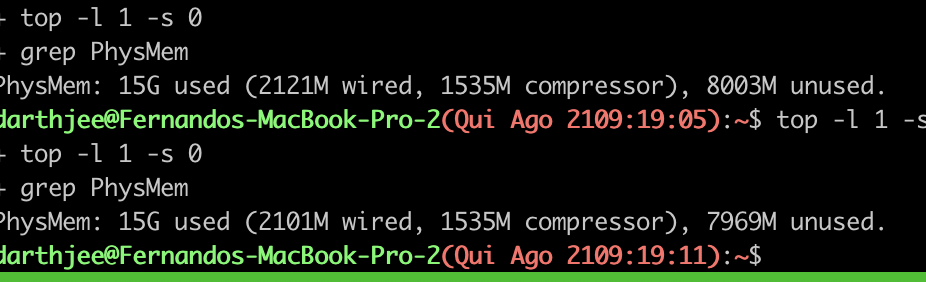
When we measured the memory footprint of these running containers, we compared the available system RAM before and during their operation. The results were quite intriguing: Image 1, a 1GB image, consumed roughly 34MB of RAM (8003Mb - 7969Mb). In stark contrast, the 13GB Image 2, which is considerably larger on disk, astonishingly used even less active memory, approximately 24MB (7983Mb - 7959Mb).

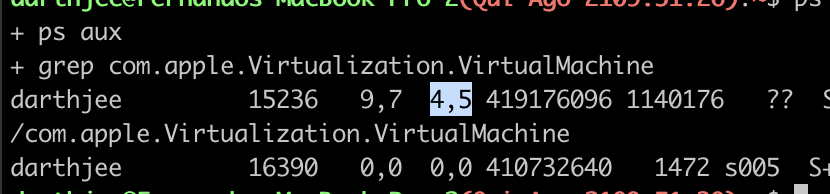
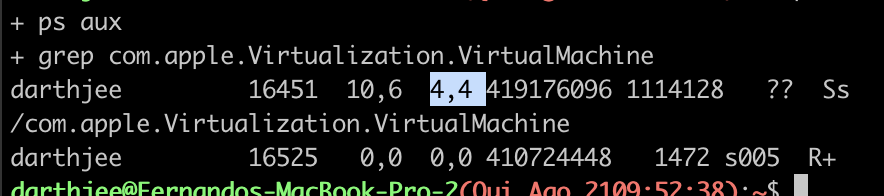
While our initial method infers memory usage from available system resources, it’s not entirely precise. A more accurate measurement, especially on macOS, involves monitoring the Docker-hosting virtual machine directly. Running, on MacOS, ps aux | grep com.apple.Virtualization.VirtualMachine provides the percentage of system memory consumed by this VM. This confirms our previous observation: the increase from the baseline usage is negligible, moving from roughly 4% to 4.5% and 4.4%.

Lastly, the docker stats command, a native Docker utility, offers a final and crucial confirmation. It distinctly shows that the actual RAM utilization between our two containers remains remarkably similar, demonstrating that on-disk image size does not dictate runtime memory footprint.

Moreover, inspecting memory usage directly from the container’s perspective provides further insight. Running top inside each container, for example via docker exec -it python_app2 top, allows us to view the memory allocation reported by its internal processes. This internal reporting consistently confirms that both containers exhibit a comparable, low memory footprint.

The memory value reported by top within a container is generally less than that from docker stats. This is because docker stats provides the container’s total memory footprint, encompassing all processes and Docker-related overhead. Thus, docker stats is the authoritative source for total memory usage.
This also implies that the extensive data within Docker layers is not loaded into RAM by default. Only the files actively accessed by the container’s processes are brought into memory from the filesystem.
Next, consider the question of file persistence: If a file is created inside a running container, where is it stored, and is it retained after the container shuts down? To explore this, I performed a quick test by generating a large random file within the container using:
for i in {1..100000}; do cat /dev/random | head >> file.txt; done
Despite creating a 360MB file, the container’s RAM usage remained unaffected. This is because file system changes within a running container are written to its writable layer, a unique overlay that exists on the host’s disk, separate from the container’s active memory. The accumulating size of this writable layer can be inspected by running docker ps -s, which details the disk space consumed by the container’s modifications.

In summary:
- The size of the image does not mean the whole image goes to occupy the RAM memory
- Only actively used files are loaded into RAM
- Any container uses a bit of memory as base plus whatever memory the process running need
- Files created in a container are written to a virtual layer called
writable container layerwhich is saved in the filesystem - command
docker statsshows the true, total memory footprint.
Leave a Reply